Talking to a model: prompts that work
On this page
Listen to this lesson · 3-minute audio overview
A prompt is more than a search query: it can be a question, an instruction, or both, and it is the whole set of instructions a model works from. Small changes to it can sometimes lead to noticeably different answers. This lesson shows what to put in a prompt, and how to improve it when the first answer misses.
On this page
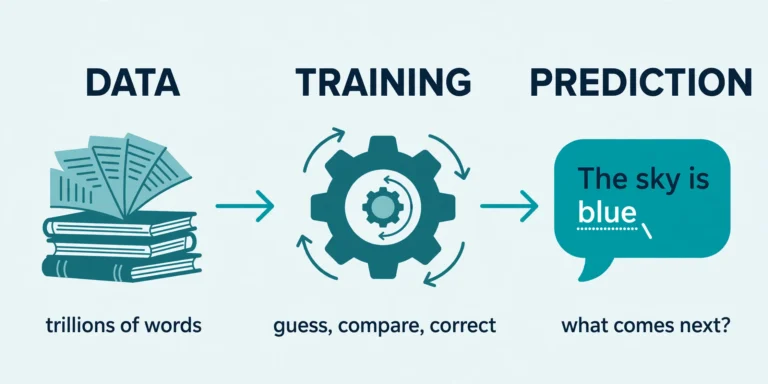
Lesson 2 explained that a model predicts the next token, again and again, until a reply grows out of the input it receives. A token is a small piece of text, such as a word or part of a word. The instructions and information supplied to a model form its prompt. This includes your message, but an application may also add its own instructions, earlier messages from the conversation, or information retrieved from documents and other sources. You control what you write and, depending on the application, what additional information you provide. Prompting well is not a trick. It is the ordinary skill of giving clear instructions, applied to a system that can interpret your request, make assumptions, and sometimes misunderstand what you mean.
1. What a prompt actually is
A prompt is the input supplied to a model when it generates a response. In a chatbot, this usually includes your message and may also include earlier messages in the conversation, instructions supplied by the application, and information retrieved from documents or connected sources. Some models can also receive images, audio, and other types of input. System instructions are rules set by the application or service provider that guide how the model behaves. They are separate from the instructions you type, and you usually cannot see or change them. Retrieved documents are information the application finds and supplies to the model, for example from a connected document collection. You only write part of this input, but your part is where you communicate what you want the model to do.
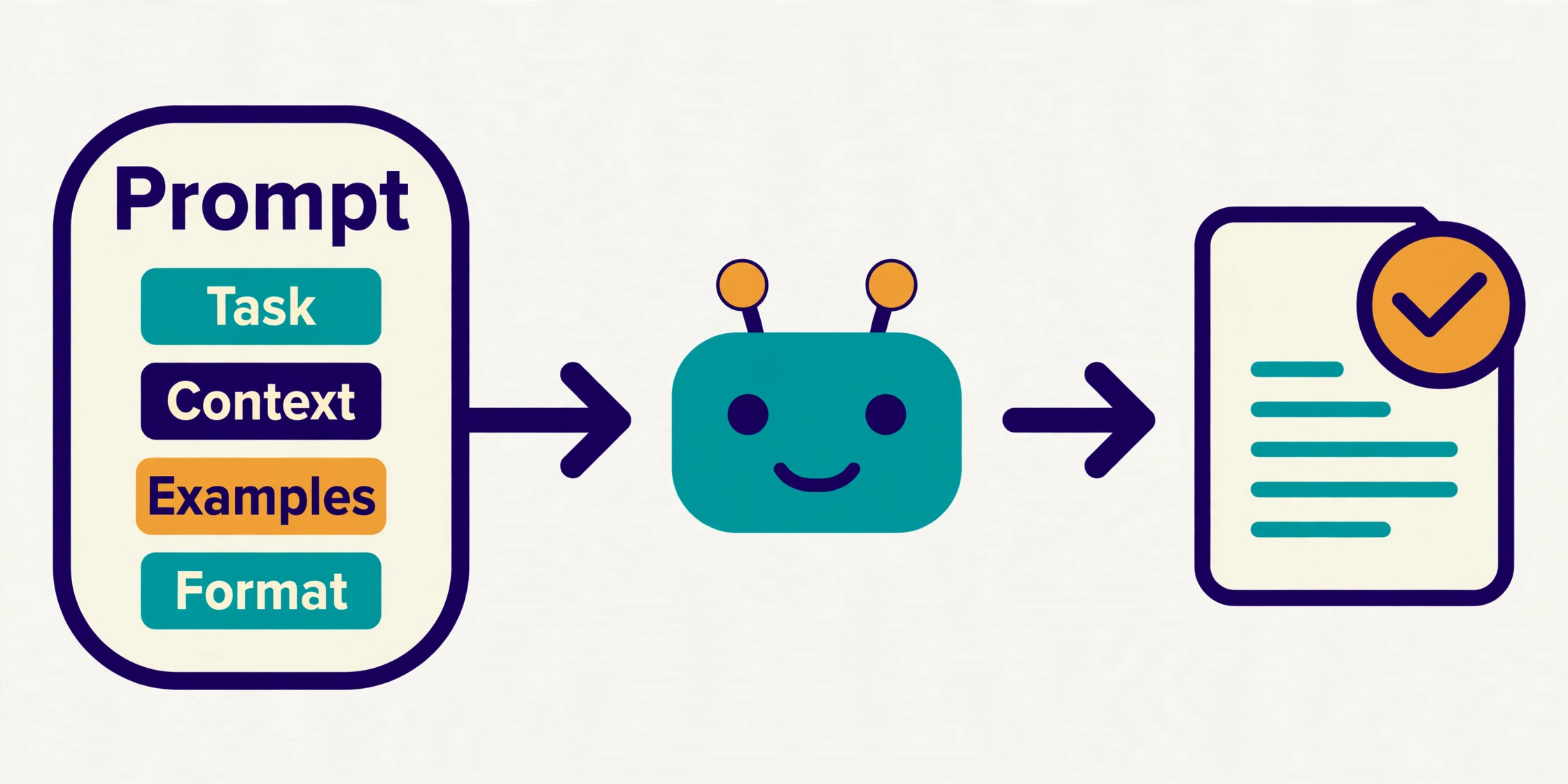
It helps to think of a prompt as having four ingredients, even though you will not use all four every time. The task is what you want done. The context is the background the model needs: who the reader is, what the situation is, what has already happened. The format is what the answer should look like: a list, a table, a short paragraph, a length limit. And the constraints are the boundaries: what to include, what to leave out, what tone to use, what not to invent. A prompt that names all four leaves less to chance than one that names only the task, though not every task needs all four, and unnecessary constraints can make a prompt worse.
Compare “Write about solar panels” with “Write a 150-word plain-language explanation of how home solar panels work, for a neighbour who is thinking about installing them, in a friendly tone, and do not mention prices.” The first prompt leaves the audience, the length, the level of detail, and the tone entirely open. The model has to guess, and its guess may not match yours. The second prompt gives the model a much clearer target, making it more likely that the answer will match what you had in mind. In that second prompt, the task is explaining how home solar panels work, the context is a neighbour thinking about installing them, the format is a 150-word plain-language explanation, and the constraint is to leave prices out.
2. Be specific: task, audience, format, limits
One of the most useful ways to improve a prompt is to make your request clearer and more specific. Four questions sharpen almost any request:
- Who is it for? “Explain photosynthesis” and “Explain photosynthesis to a ten-year-old” are different tasks, and the model cannot tell which one you mean unless you say so.
- What should it look like? Ask for the format you want: three bullet points, a table with two columns, a subject line under ten words. Specifying the format reduces ambiguity about how the answer should be presented.
- How long? A word count or a limit such as “in two sentences” gives the model a target, although you may need to check the result and adjust, since models do not always hit exact numbers.
- What counts as done? Name the outcome: “a draft I can send”, “a list I can choose from”, “an explanation I can repeat to a colleague”. For example, instead of “Help me with this email”, try “Draft a polite reply declining the invitation while leaving open the possibility of meeting another time.”
Specific does not mean long. A prompt can be specific in one sentence. What matters is that the details you include are the ones that change the answer. The audience, the format, and the length can change the answer when they are relevant to the task. Extra background that does not help with the task can make the request harder to interpret.
3. Show, do not just tell: examples and context
Sometimes describing what you want is harder than showing it. Giving the model one or two examples of the result you want can help it follow a particular pattern. This is sometimes called few-shot prompting: including examples in the prompt before making your request. A “shot” simply means an example. If you want product descriptions in a particular style, paste two descriptions you like and ask for a third in the same style. If you want meeting notes in a fixed layout, paste one set of notes and ask for the next meeting in the same layout. The examples give the model additional guidance, including details you might not have thought to describe, such as how formal the tone is or how the headings are ordered. They do not guarantee an exact match, so check the result.
Context works in a similar way. A model can use information from your current conversation, but it does not automatically know everything about your life, your work, or your previous conversations. Some products also offer memory features that can retain useful information between conversations. Others can access connected files or services when you give them permission. “Summarise this” without providing a document or giving the model access to one is not enough; “Summarise the report below in five bullet points, keeping the three cost figures” gives it the material and the shape at once. When the answer depends on information only you have, provide that information, attach the relevant document, or use an available feature that can retrieve it. The more relevant context the model has, the less it has to guess.
For problems with several steps, you can ask the model to explain its approach or show the steps behind a calculation. For example, “Show the calculation step by step” can make it easier to check whether the result is correct. This is related to a technique called chain-of-thought prompting, which encourages a model to produce intermediate reasoning steps. Research has found that this can improve performance on some multi-step reasoning tasks, although the results vary by task and model. One important limitation: the explanation a model produces is not necessarily a faithful record of how it actually arrived at its answer. Treat the steps as something to check, not proof that the conclusion is correct.
4. Iterate: treat the first answer as a draft
The first answer may already be good enough. But when it misses something, that is normal, and a follow-up instruction can improve it. Prompting is a conversation, not a single shot. When the reply misses, do not start over from scratch. Tell the model what to change: “shorter”, “less formal”, “keep the second paragraph, rewrite the first”, “you missed the point about cost”. Each round narrows the gap between what you meant and what the model understood.
It also helps to ask the model to check its own work. “What is missing from this answer?” or “What would a sceptical reader object to here?” often surfaces gaps the first draft glossed over. Treat that review as another source of suggestions, not independent verification. A model can overlook its own errors or confidently approve a flawed answer, so for important facts, check the original sources. And when an answer is good except for one part, say so, and ask for only that part to change. Rewriting the whole prompt throws away the parts that worked.
One habit worth building: when a prompt works well, save it. A good prompt for a recurring task, a weekly report, a standard email, a regular summary, is worth keeping and reusing, with the details swapped each time. Over weeks this becomes a small personal library of instructions that more consistently produce the results you want, which is exactly what Lesson 5 builds into a full workflow. A saved prompt is a reusable instruction, not a guarantee of identical output.
5. Five ways prompts go wrong
Most bad answers trace back to a small set of prompt mistakes. Watch for these:
- Too vague. “Help me with my presentation” gives the model nothing to work with. Compare it with “Create a five-slide outline for a ten-minute presentation introducing our new product to potential customers.” Name the task, the audience, and the outcome.
- Too much at once. A prompt that asks for a summary, a critique, a rewrite, and a translation in one go makes it easier for the model to overlook a requirement. Split it into steps, or ask for one thing and build on the result, especially when the steps depend on one another or accuracy matters.
- Assuming shared knowledge. The model may have access to earlier messages in the current conversation, but it does not know your project, your team, or details from a different conversation unless that information is in the prompt or the product makes it available. Abbreviations, names, and inside references need explaining.
- Leading the answer. “Explain why solar panels are the best option” asks for an argument, not an assessment. If you want a balanced view, ask for one: “What are the main arguments for and against home solar panels?” A model will often follow the direction your wording points in, because the prompt frames the question in a way that encourages a particular answer.
- Asking for information the model cannot access. A prompt cannot guarantee that a model will know an obscure fact, have access to a private document, or possess up-to-date information. Models can use information from their training, draw inferences from what you provide, and, when the application supports it, retrieve information using tools such as web search or connected files. If an answer depends on a particular document, website, or piece of information from your own work, provide it or make sure the application can access it. If the information is unavailable, ask the model to say so rather than guess. Lesson 4 looks at what happens when a model fills gaps with plausible but incorrect answers.
Try it: one vague prompt, three better ones
About 10 minutes, with any chatbot that lets you send follow-up messages.
- Start vague. Ask: “Write something about working from home.” Read the answer and note what it assumes: who it is for, how long it is, what tone it uses.
- Add one ingredient. Ask again, adding an audience and a format: “Write a 100-word tip list about working from home, for someone starting their first remote job.” Compare the two answers. Which parts changed, and which stayed the same?
- Add an example. Now write one example tip in the style you want. Paste it into the chat and ask: “Write three more tips in the same style as this one.” Does the style carry over?
- Iterate once. Pick the best answer so far and ask for one change: “Make it shorter” or “Make it friendlier”. Notice how much less you need to re-explain when the conversation already holds the context.
Keep all four answers side by side. Compare how the audience, format, and example changed the results, and whether your final instruction improved the answer. The point of the exercise is to see how additional guidance changes the output, not simply to decide which answer is best.
Key terms
- Prompt: the input supplied to a model, which may include text, images, audio, conversation history, and application-provided instructions or information.
- System instructions: instructions supplied by the application or service provider that guide the model’s behaviour. They are separate from the user’s message and may not be visible to the user.
- Context: the information available to the model for a particular response, including relevant conversation history and any supplied or retrieved material.
- Retrieval: finding relevant information in an external source, such as a document collection or a web search, and supplying it to the model as additional context.
- Few-shot prompting: giving the model a few examples of the result you want, included in the input to demonstrate the desired pattern or task. A “shot” is one example.
- Chain-of-thought prompting: a prompting technique that asks a model to produce intermediate steps or an explanation before a final answer. The explanation may not faithfully represent the model’s internal processes, so check the steps.
- Iteration: improving a result through successive rounds of feedback, changing one thing at a time instead of starting over.
- Leading prompt: a prompt that frames a question to encourage a particular conclusion, rather than asking for a balanced answer.
- Prompt library: a saved collection of prompts for recurring tasks, reused with the details changed each time.
Keep going
Next: Lesson 4, When the model is wrong: hallucination, bias, and checking. Prompting well makes good answers more likely, but it cannot make them guaranteed. The next lesson looks at what goes wrong even with a good prompt, and how to catch it.
Further reading on this site: Lesson 2, which explains why the model predicts one token at a time, and why the prompt is the main thing you control.