Who Holds the Keys When AI Runs the Household?
On this page
- Why This Question Matters Before AGI
- Give Each Task Its Own Permission Level
- Make Permissions Real
- Keep Family Data Under Separate Control
- Shared Household Information
- Personal Information
- Information Requiring Extra Care
- Judge a Mistake by Its Recovery Cost
- Make Approval Worth Reading
- Test How Authority Ends
- Keep the Household Portable
- Keep a Manual Household Mode
- Write a One-Page Household Agreement
- A Practical First Month
- Week 1: Inventory Existing Connections
- Week 2: Begin With Preparation
- Week 3: Test the Boundaries
- Week 4: Decide Whether to Expand
- Final Takeaway
- Where to Go Next
- Sources and Further Reading
- Agent Identity and Authorization
- Consumer Access and Portability Examples
Artificial intelligence (AI) can take useful work off a family’s plate. The household still needs to control what it can see, what it can change, and how its authority ends.

An AI assistant that plans meals, sorts paperwork, compares bills, and keeps track of appointments could remove a meaningful amount of household work.
The appeal is easy to understand. Daily life contains hundreds of small decisions. Many are repetitive. Some are easy to postpone until they become expensive or urgent.
But consider a hypothetical household assistant that is asked to reduce monthly expenses. Finding duplicate subscriptions is useful. Canceling an insurance policy because it looks expensive would carry a different consequence. Both actions might appear to satisfy the same broad instruction.
As software moves from suggesting actions to carrying them out, a household has to decide who can authorize what.
The practical goal is to make useful delegation possible while keeping the family able to understand, interrupt, and replace the system.
This article proposes a household framework for doing that. It covers delegated authority, family data, recoverable mistakes, revocation, portability, and manual fallback. These are planning recommendations, not a certification standard or a claim that every product currently supports the necessary controls.
Why This Question Matters Before AGI
The threshold that matters here is access to real tools. A system does not need to qualify as artificial general intelligence (AGI) to send a message, edit a calendar, or use a connected account.
On August 27, 2026, researchers at the National Institute of Standards and Technology (NIST) warned that agentic AI deployments were repeating familiar identity and access-management mistakes. Their concerns included shared credentials, overly broad access, and approval requests frequent enough to encourage careless consent. They argued for identifiable agents with authority tied to the people or systems delegating to them. NIST’s analysis
On September 29, NIST announced a summary of feedback on its software and AI agent identity project. Its first implementation use case will be in software development. The project is still evolving; it has not delivered a completed household AI safety standard. NIST project update
The household application is an editorial judgment: permission design belongs near the beginning of adoption, while the assistant’s responsibilities are still small enough to understand.
The broader series makes the same planning choice about uncertain timelines. Preparing for Different AGI Timelines focuses on decisions that remain useful under several futures. A clear boundary around delegated authority is one of those decisions.
Give Each Task Its Own Permission Level
A single setting called “trusted assistant” tells a family very little.
Trust can vary by task. A system might be useful for summarizing an appliance manual and still be an inappropriate choice for deciding whether to accept a medical treatment, change insurance coverage, or move savings.
Use five permission levels as a starting point.
| Level | What the assistant may do | Household example |
|---|---|---|
| 1. Read and summarize | Inspect specifically approved information | Summarize a home manual or an approved calendar |
| 2. Prepare for review | Create a proposal without committing the household | Draft a grocery basket, message, or itinerary |
| 3. Act within limits | Complete a narrow, preapproved routine | Replenish approved items within a total spending limit |
| 4. Ask before acting | Present the exact consequential action for approval | Share sensitive information or change a booking |
| 5. Human decision and execution | Help with analysis while a person performs the final action | Move money or change account-security settings |
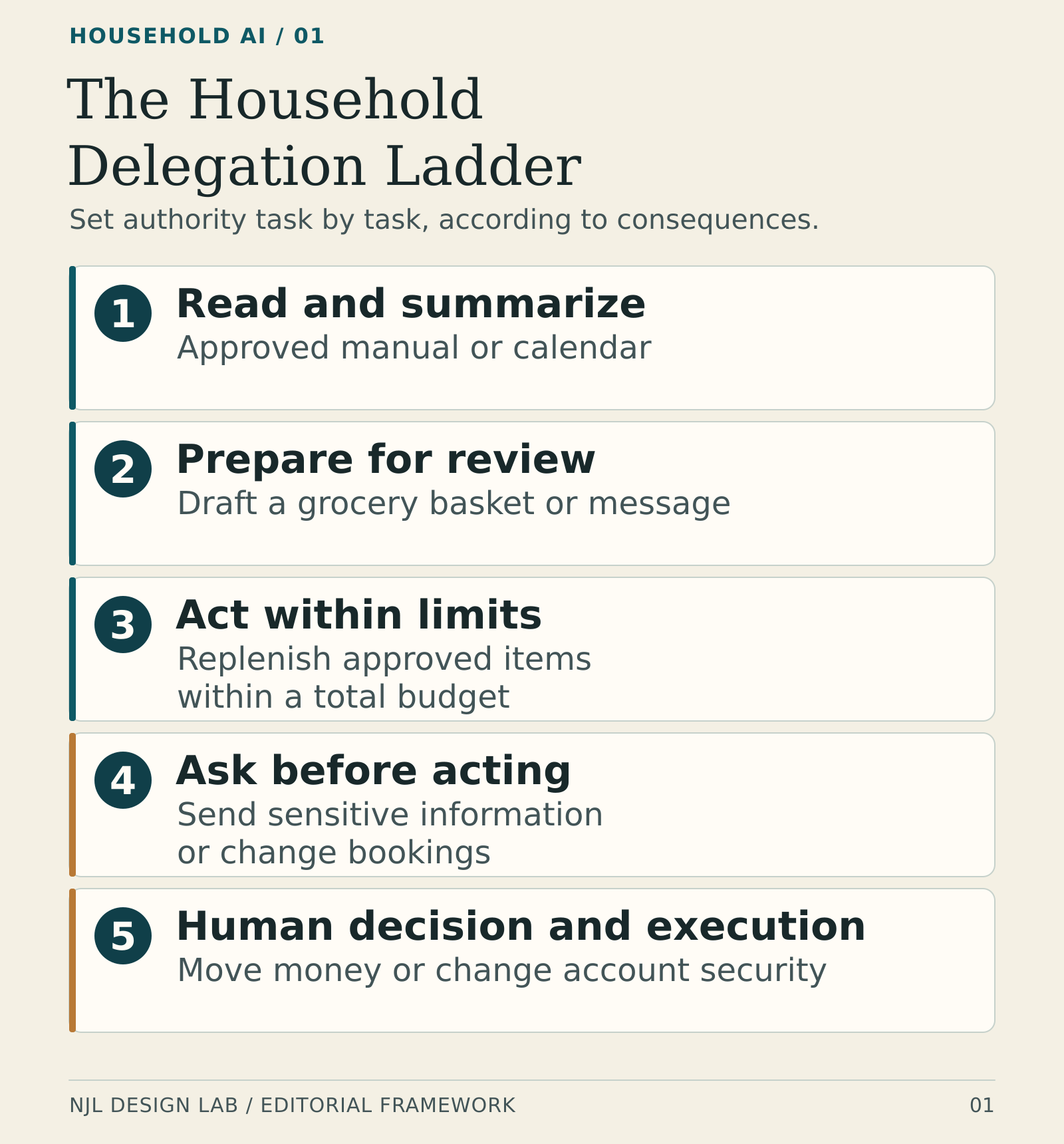
These levels apply to actions rather than whole apps. The same travel assistant could research freely, prepare a proposed booking, and stop before payment. A household calendar tool could add a private reminder while requiring approval to cancel an appointment involving someone else.
Read-only access also deserves scrutiny. A tool that cannot change an account may still see information the household would prefer to keep private.
Start with the lowest level that produces a useful result. Broader authority should follow a demonstrated need, a workable control, and an acceptable failure outcome.
Success at making a shopping list provides little evidence about suitability for managing a bank account.
Make Permissions Real
A written instruction is useful, but a household should also inspect what the connected system actually permits.
If the instruction says “summarize my mail,” does the connection grant the ability to send or delete messages? If the assistant only needs the family calendar, does the integration expose an entire account?
The Open Worldwide Application Security Project (OWASP) identifies excessive functionality, permissions, and autonomy as causes of damaging agent behavior. Its guidance recommends minimizing tool capabilities and enforcing authorization in connected systems rather than relying entirely on the language model to decide what is allowed. OWASP on excessive agency
For a household, that means looking for controls such as:
- separate read and write permissions;
- access to selected calendars or folders;
- approved merchants, recipients, and device actions;
- transaction and cumulative spending limits;
- a clear expiration or review date;
- a record of which account authorized each action.
Availability varies. Some consumer integrations still offer a broad connection when the family needs a narrow one. When the product cannot enforce a boundary, reduce the job: provide a selected document, use a separate low-risk workspace, or keep the final action manual.
Avoid giving an assistant the family’s general account password as a shortcut. Google, for example, explicitly recommends its limited account-access flow instead of sharing a Google Account password with a third-party app. Google’s account-access guidance
A second boundary concerns instructions found in content. A webpage, email, or downloaded document may contain text that tries to redirect the assistant. OWASP describes this as one route to excessive agency. Treat outside content as material to inspect; it should not be able to grant itself household authority. OWASP’s examples
Keep Family Data Under Separate Control
A household contains several people with different responsibilities, relationships, and privacy needs.
The person who installs an assistant may manage the technology. That should not automatically make every other person’s messages, location history, health information, or private notes available to it.
A useful starting arrangement has three parts.
Shared Household Information
This might include appliance manuals, maintenance schedules, a grocery list, utility account contact information, and a calendar deliberately created for shared logistics.
Even shared information should have a purpose. A meal-planning assistant rarely needs the whole household document archive.
Personal Information
Each adult should decide which personal information can enter a shared workflow and who can receive the result.
An assistant may need to know that someone is unavailable on Tuesday afternoon. It may not need the reason, the provider’s name, or the contents of an appointment reminder.
Access and disclosure are separate decisions. Permission to help one person understand a document does not automatically authorize summarizing it for everyone in the home.
Information Requiring Extra Care
Children’s records, medical documents, identity documents, intimate conversations, and detailed financial information deserve tighter boundaries.
Begin with a specific task and the smallest useful extract. Before uploading, check what the service stores, who can access it, and how deletion works. Explain age-appropriate boundaries to children rather than making the assistant an invisible observer of family life.
These are household design recommendations, not a substitute for applicable privacy law or professional advice.
Also consider what combined information reveals. A calendar, purchase history, and location pattern can expose more than any one file. Creating a shared summary is itself a disclosure decision.
Judge a Mistake by Its Recovery Cost
The price of an action is only one part of its risk.
A small purchase may be straightforward to return. An inexpensive message can damage a relationship. Deleting the wrong photo may cost nothing immediately and still destroy something irreplaceable.
Before increasing autonomy, ask four questions:
- How quickly would someone notice the mistake?
- Can the original state be restored?
- What money, time, privacy, or relationships would remain affected?
- Who would do the recovery work?
| Proposed task | What recovery might require | Sensible starting boundary |
|---|---|---|
| Build a grocery basket | Review and remove unwanted items | Prepare for review |
| Place a routine order | Cancel or return, subject to seller rules | Narrow item list and total limit |
| Move an appointment | Restore availability and notify other people | Ask before changing it |
| Share a family document | Request deletion from recipients; copies may remain | Review exact file and recipient |
| Remove duplicate photos | Restore originals from a verified backup | Preview candidates; preserve originals |
| Change insurance coverage | Provider action; an interruption may be consequential | Human review and execution |
| Unlock a door | Physical access has already occurred | Keep direct human control |
The table is a proposed starting policy, not a claim about how any particular product behaves.
Repeated actions need a limit too. A modest per-order cap can still permit excessive spending if the assistant places many orders. Consider the total over a day or week, duplicate detection, and a stop after unexpected results.
For an illustrative grocery routine, a family might authorize one order from its usual store, using a named list, below a total that includes fees and delivery. A changed address, new subscription, or uncertain substitution would stop the order for review.
The useful unit of delegation is a bounded job with a known recovery path.
Make Approval Worth Reading
An approval screen should give the person enough information to decide.
“Continue?” is inadequate when continuing changes a reservation or shares a document. A useful request states the action, account, recipient or provider, total cost, timing, and relevant consequences. It also explains what changed from the original plan.
For example:
“Send this repair request to the property manager, including the kitchen photo and your available appointment times?”
The user should be able to inspect the message and attachment. There should be a simple way to revise or decline.
Save interruptions for decisions that need them. A bounded routine can proceed within its approved limits, with a readable completion record. An exception should pause at the point where a person can still prevent the consequence.
This is partly a workload question. If supervising the assistant takes more attention than performing the task, reduce the scope before adding more automation.
Test How Authority Ends
Before depending on an assistant, learn how to stop it without asking that same assistant for help.
A chat command to stop, a paused workflow, a removed account connection, and a canceled transaction can have different effects.
The OAuth token-revocation specification provides a mechanism for invalidating access credentials. It also recognizes implementation differences and possible propagation delays. That is a technical building block, not a guarantee that a consumer app’s stop button immediately ends every downstream activity. IETF RFC 7009
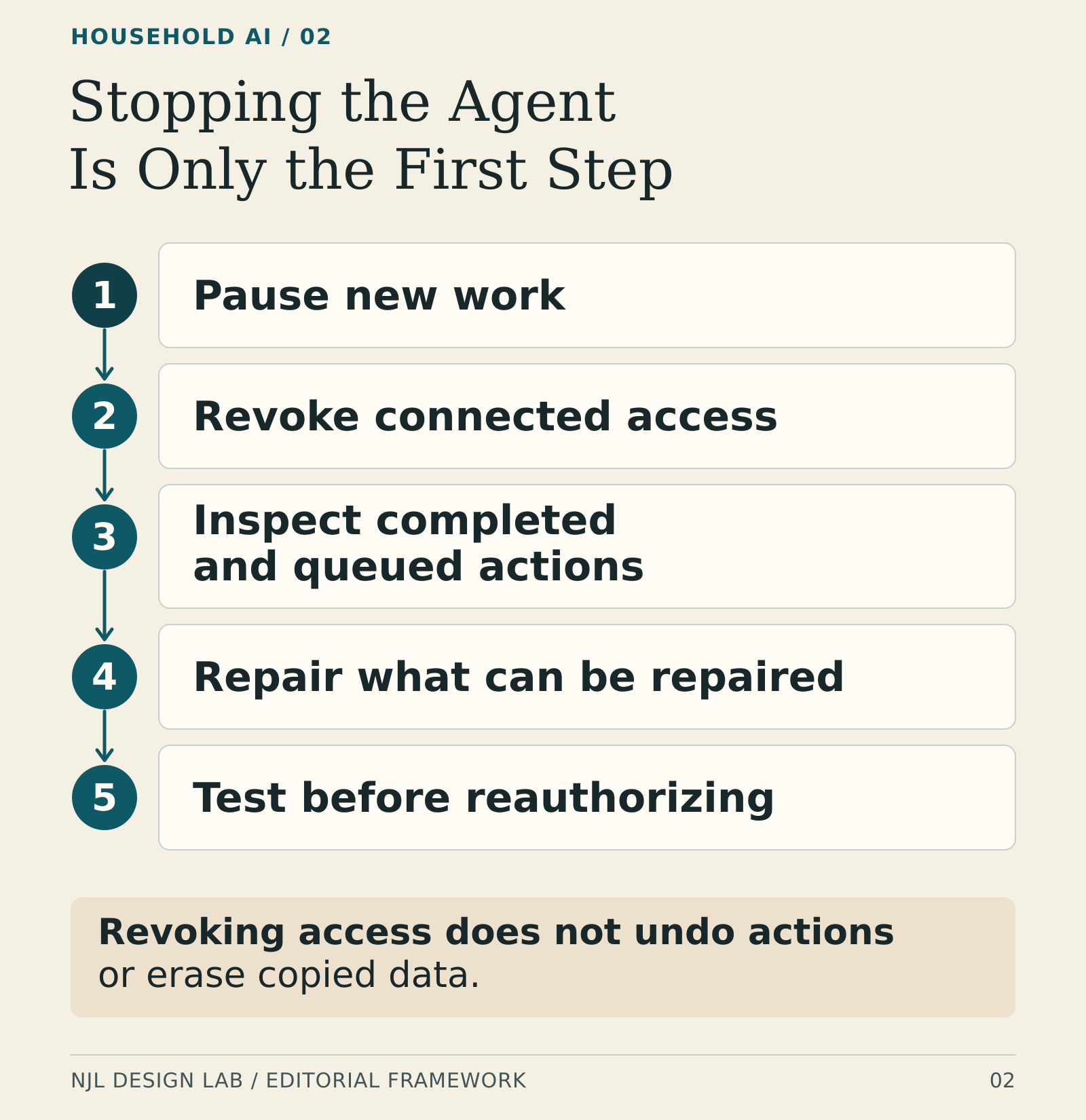
Use a harmless test workflow to inspect five steps:
- Pause new work through a control you can reach directly.
- Revoke connected access where appropriate.
- Inspect completed actions and work already queued elsewhere.
- Repair what can be repaired, using the original service when necessary.
- Test the revised boundary before reauthorizing the assistant.
Google also distinguishes an agent’s task permission from the underlying app connection: removing agent permission stops the agent from acting, but does not itself disconnect the linked app from the Google Account. Check both controls when withdrawing authority. Google’s agent-permission guidance
Removing access does not necessarily delete information already copied. Google’s documentation makes that distinction explicit and says a user may need to request deletion from the app developer. Google on previously shared data
Nor does revoking a connection automatically cancel a delivered message, a placed order, or an appointment accepted by another system.
For each important integration, record the relevant account-settings page, what revocation stops, how to inspect recent activity, and how to contact the service directly. If those answers are unclear, keep the integration’s responsibilities small.
The test is practical: can an authorized household member regain control when the assistant is unavailable or behaving unexpectedly?
Keep the Household Portable
Convenience can become dependence when the assistant is the only place where the household’s working knowledge exists.
Keep essential information in a form that people can read without reconstructing months of chat: upcoming commitments, contact details, maintenance records, recurring obligations, and a short explanation of important routines.
Where possible, preserve original documents alongside AI summaries. A summary may omit the cancellation date, exception, or account detail needed later.
Ask three portability questions before moving more household work into a product:
- Can the underlying records and useful outputs be exported?
- Can another person or service actually read them?
- Can the workflow be rebuilt without depending on the old assistant’s private context?
An export button answers only the first question. Google Takeout, for example, provides downloads of selected Google data, but availability of an archive does not by itself establish that another assistant can recreate a workflow. Google’s export documentation
Test a small export. Open it. Find a particular event or document. Check dates, attachments, and any recurring rules that matter.
Store the resulting files securely and share them only with people who should have access. Portability should not create a new unprotected copy of the family’s sensitive information.
Keep a Manual Household Mode
An assistant outage should create inconvenience rather than make ordinary life impossible.
Decide which functions must remain available: access to the home, essential appointments, bills due soon, necessary contact information, and the safe operation of important equipment.
Then identify a fallback for each. That might be a physical key, a locally available calendar, a readable list of service providers, or a normal appliance control that works without an AI interface.

A fallback should be usable by the person who will need it. A technical recovery procedure stored only in the administrator’s account may be inaccessible when that administrator is away.
For shared responsibilities, agree on appropriate backup access. Preserve individual privacy: being able to manage the utility account does not require opening another adult’s private messages.
Run a short, safe exercise. Without using the assistant, find tomorrow’s appointments, locate the current maintenance record, and explain how to stop one low-risk automation. Do not interrupt medical equipment, alarms, heating protection, or other safety-critical systems to stage a test.
This extends the practical capacity discussed in Household Self-Sufficiency in the Age of AGI. Household capability includes knowing how ordinary systems work when the convenient interface disappears.
Write a One-Page Household Agreement
A family does not need a corporate governance department. It does need a short agreement that people can understand and revise.
For each recurring AI-assisted routine, record:
- Purpose: What useful work is being delegated?
- Owner: Who can authorize it and resolve exceptions?
- Data: Which information can it use, and whose consent is needed?
- Authority: May it read, prepare, act within limits, or request approval?
- Limits: Which accounts, recipients, amounts, times, and actions are allowed?
- Evidence: Where can a person see what it actually did?
- Exit: How is it stopped, and what is the manual fallback?
- Review: When will the family reconsider whether it is still useful?
Treat this as a discussion first. One adult should not quietly delegate decisions that commit another adult’s money, time, or personal information.
Life changes also change permissions. A move, separation, caregiver change, lost device, or child growing older may require a review before the routine continues.
Keep the document separate from passwords and recovery secrets. It should describe where authorized people can obtain access without becoming an unsecured master key.
A Practical First Month
Week 1: Inventory Existing Connections
List the assistants and automations already in use, the accounts they can reach, and the actions they can take. Remove obsolete connections through the relevant service’s official settings. Preserve anything needed to recover important records before changing access.
Choose one low-consequence routine worth improving.
Week 2: Begin With Preparation
Let the assistant summarize or prepare the work while a person performs the consequential action. Compare the output with the source. Record omissions, incorrect assumptions, and the time required to check it.
Use ordinary examples, including one where the right answer is to ask for help.
Week 3: Test the Boundaries
Check what happens when information is missing, the proposed action exceeds a limit, or two instructions conflict. Use harmless test data where possible.
Try stopping the workflow. Inspect the record. Confirm that the manual route still works.
Week 4: Decide Whether to Expand
Compare time saved with time spent supervising and repairing. Include subscription costs and any burden shifted to another person.
Expand one narrow permission only if the routine is useful, the boundary can be enforced, and the recovery test worked. Otherwise keep it in preparation mode, simplify it, or stop using it.
A successful first month may end with a small, reliable workflow. There is no requirement to give the assistant more responsibility simply because it offers more features.
Final Takeaway
AI can make a household easier to run. The strongest arrangement gives it a clear job and keeps people able to see and change the terms.
Before expanding access, establish who can authorize the work, which data it needs, what mistakes would cost, how permissions end, and how essential routines continue without it.
The household should still understand its obligations and retain a usable way to take over.
Who holds the keys? The people whose money, information, relationships, and home are affected.
Where to Go Next
- Preparing for Different AGI Timelines: decisions that remain useful across uncertain futures.
- Household Self-Sufficiency in the Age of AGI: lower costs, practical capacity, and fewer fragile dependencies.
- AGI and Household Resilience: the full NJL Design Lab reading path.
Sources and Further Reading
Agent Identity and Authorization
- NIST: Back to the Future: Why Agentic AI Needs a Strong Identity Foundation, August 27, 2026.
- NIST: Comments on Software and Agentic AI Identity Concept Paper, September 29, 2026.
- OWASP: LLM06:2025 Excessive Agency.
- IETF: RFC 7009, OAuth 2.0 Token Revocation.
Consumer Access and Portability Examples
- Google: Share some access to your Google Account data with apps from other developers.
- Google: Manage links between your Google Account and apps from other developers.
- Google: How to download your Google data.
Research checked October 9, 2026. Product controls and the NIST project may change. The permission ladder, household agreement, and first-month plan are NJL Design Lab editorial frameworks; they do not certify a product or guarantee that automation is safe.